
The panel on the left, which we refer to as the "Field" shows the actual position of the robots at any given time on their trajectories. The reference point of 0 degrees occurs at x=1 on the unit disk shown below. Before an algorithm starts, you must select a location for the exit by inputting a number, and clicking submit. The algorithm will then begin.
The panel on the right, which we refer to as the "Graph", show the absolute distance of each robot from the current exit position, in units. The current time and number of frames that the animation has played for will be displayed in the top left. Below the time, are four buttons which can be used to replay, slow, rewind, and stop the animation playback, once it has finished. Clicking "Slow" more than once can slow the animation down more in whichever direction it is currently playing. In the top right of the Graph is the robot legend. This shows the Robot ID number, color, and whether or not the robot is designated as priority. If it is a priority robot, it will be shown with "Queen" instead of "Bot".
When there priority robots in the algorithm, an extra panel will show below the Field and Graph. This is a special graph that we call the Worst Case Visualizer. It shows the distance of the priority from one of the Helpers in a simulation of the algorithm where no exit is present. This graph allows us to see the time it would take the algorithm to finish, based on the frame number. If the Helper were to find the exit on any of the given frame numbers, the "Time to Finish" datapoint will show us the worst case time that the algorithm would finish based on how far the priority currently is from the Helper which found the exit.
This research is supported by the National Science Foundation under grant # CCF-AF 1813940 (RUI: Search, Evacuation and Reconfiguration with Coordinated Mobile Agents).
Click here to view the full documentation. This will open a new tab.
Click here to compare this to another algorithm in its category. This will open a new tab.
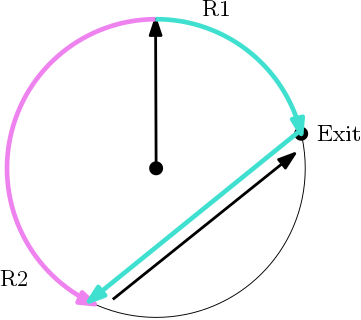
R1 intercepting R2 after finding the exit.
Algorithm referenced in: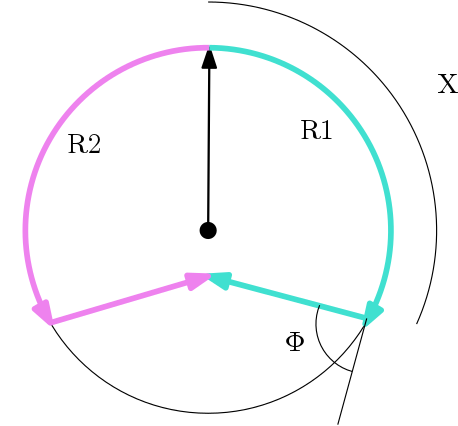
Both robots take a detour at angle Φ after searching for distance X.
This method takes advantage of the detour phase to provide a slightly faster evacuation time in the event that the exit is found quickly. The robot which finds the exit will travel less distance to intercept the other if it is currently in its detour phase, thus lowering the overall time. The only time which this does not apply is for a smaller set of exit positions, which are observed after the detour phase.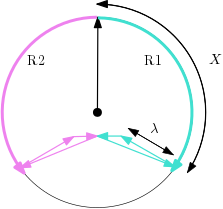
Both robots take a detour at angle Φ after searching for distance X, follow it for λ seconds, then go directly toward the center.
This method takes advantage of the triangular detour phase to provide a slightly faster evacuation time in the event that the exit is found quickly. The robot which finds the exit will travel less distance to intercept the other if it is currently in its detour phase, thus lowering the overall time. The only time which this does not apply is for a smaller set of exit positions, which are observed after the detour phase.Coming soon.
Algorithm referenced in:
Algorithm referenced in:
Jurek Czyzowicz et al (2018). Priority Evacuation from a Disk Using Mobile Robots. Proceedings of SIROCCO, pages 392-407, 2018.